
Free · Do plan
Rainbow Circular Music Visualizer
The Rainbow Circular style in DoReMiWave
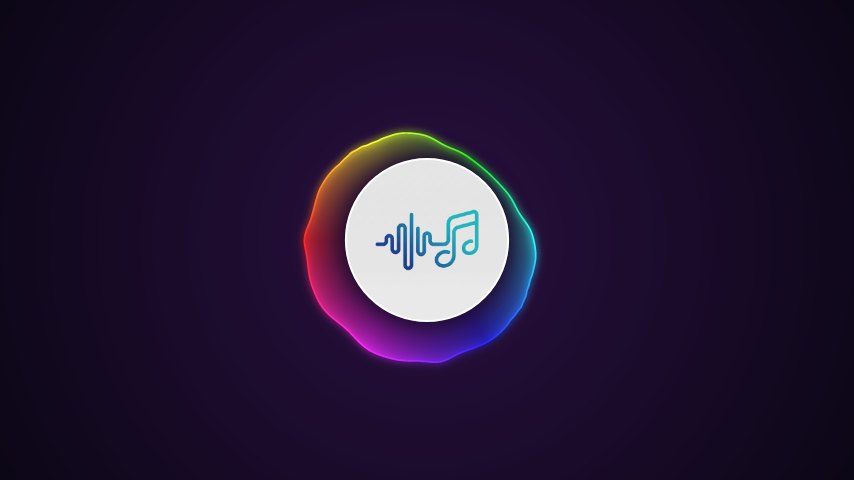
Rainbow Circular wraps a smooth, glowing rainbow shape around a disc in the middle of the screen, on a colourful gradient background. It is one of the three styles on the free Do plan, so you can make a video without paying anything.
How Rainbow Circular moves with your music
The shape follows the spectrum of your song all the way around the circle: its edge swells with the bass and ripples with the highs, drawn with a fine glowing outline, and the ring can turn as the song plays. On Sol and Clef you can also make the rainbow colours travel around the circle and fine-tune the size and the glow.
The background is a two-colour gradient you can change, and the disc can hold your own cover or logo.
What you can adjust
Spectrum
- Circle Bars Height
- Circle Size Sol
- Glow Sol
- Rainbow Speed Sol
Disc & Logo
- Disc Size
- Disc Border Thickness Sol
Options
- Gradient background colours
- Mirror
- Rotation and spin
- Your cover or logo in the disc
On every plan you can also add text (your song title and artist name), put your cover or logo in the centre and change the background colours. Sol and Clef add particles, a flash on the bass and a time display (on Do you can try these in the preview), plus your own background image on every style (on Do it works with Classic Bars) and a full equalizer; Clef adds video backgrounds.
Export options
| Plan | Resolution | Frame rate | Formats | Watermark |
|---|---|---|---|---|
| Do (free) | up to 720p | 30 fps | 16:9 landscape | On by default, can be switched off |
| Sol | up to 1080p | 30 or 60 fps | 16:9 landscape, 9:16 portrait | None |
| Clef | up to 1440p | 24, 30 or 60 fps | 16:9 landscape, 9:16 portrait, 1:1 square | None |
Every video is an MP4 (H.264 video, AAC audio), ready for YouTube, TikTok, Instagram and every other platform.
How to make a video with Rainbow Circular
- Open the Studio and upload your song — MP3, WAV, FLAC or M4A.
- Choose Rainbow Circular in the Style section, or use the button on this page, which opens it for you.
- Adjust it while your song plays in the preview, and add your title, cover or background.
- Export. We render the video on our servers and email you when it is ready to download.
Works great for: Pop, kids’ songs, party tracks and anyone who wants a colourful video for free.
More music visualizer styles
Make your Rainbow Circular video
Upload your song and watch it move in seconds. Free, no card needed.
Try Rainbow Circular